
In the contemporary technical world, automation is vital for businesses to drive productivity, enhance efficiency, and foster innovation. Implementing effective automation solutions is crucial for competitiveness and operational efficiency. This guide focuses on creating productive automation solutions, such as organizing YouTube community posts and automating polls and quizzes, to boost engagement, save time, and enhance the subscriber base. Business automation improves operational efficiency by minimizing manual intervention in repetitive tasks, allowing employees to focus on higher-value activities. It improves accuracy by executing complex calculations and precise data entry, reducing human error. Its scalability supports smooth expansion, allowing for increased work volumes without manual effort.
The Power of Automation for YouTube Creators
YouTube is a powerful platform to share content and connect with a global audience. However, managing a successful channel requires significant time and effort, often involving repetitive tasks. Automation offers a strategic advantage for YouTube creators, enhancing productivity, simplifying procedures, and fostering audience engagement. This modification enables creators to focus on content creation and strategy, ensuring a consistent online presence. Automated marketing tools can target specific viewer segments, boosting viewer satisfaction and engagement. Delivering timely responses to comments and queries further improves the viewer’s experience & engagement. Automation also strengthens compliance and reporting by adhering to YouTube’s policies, reducing the risk of violations and penalties. Accurate insights into channel performance enable creators to make informed decisions and refine their content strategy.
Enhancing YouTube Community Engagement
YouTube is a platform that not only hosts videos but also engages with its audience through interactive features like community posts, polls, and quizzes. These features provide valuable feedback and are time-consuming to manage manually. Automation simplifies these tasks, allowing creators to focus on content creation. YouTube’s community-building feature is enhanced by scheduling regular posts, polls, and quizzes. Automated responses and moderation tools manage comments, fostering a positive environment and reducing spam and negative interactions.
Automated community posts are a powerful way to engage with your audience beyond video content, providing regular updates and announcements without requiring manual effort, as explained in this guide.
How to set up automated community posts?
Use Make.com, a robust tool that integrates with over a thousand apps.
Sign up for Make, navigate to the Scenarios page, and set up triggers.
Sign up with this link to get your free 1 Month Pro plan with over 10,000+ operations click here
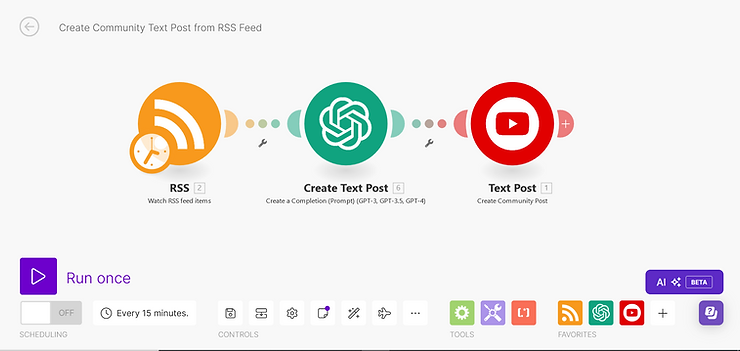
Use an RSS feed as a trigger to pull in relevant content.
Generate the post content from the RSS feed data using OpenAI’s GPT-4. Customize your prompts to ensure the content aligns with your channel’s voice and style.
Use the YouTube Custom App Module to publish the generated content to your community page, inputting your Channel ID and configuring the post type to “Community Text Post.”
Set the frequency and decide how often (Daily/Weekly) you want posts to be published according to your content strategy.
2. Creating Automated, Engaging Polls
Polls are a powerful tool for engaging and fostering communities. They help understand audience preferences, interests, and reactions to various content.
How to set up automated community polls?
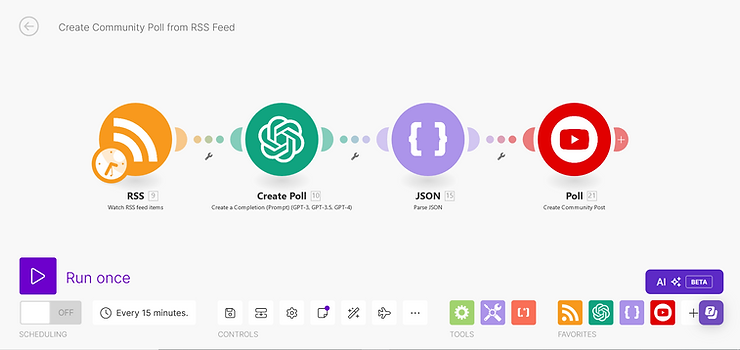
Configure an RSS feed to pull in data relevant to your polls.
Create poll selections and questions with OpenAI. Follow JSON format and character restrictions for YouTube’s poll specifications in your instructions.
Use the JSON module to convert the OpenAI output into JSON format.
Update your community page with the structured poll using the YouTube Custom App Module.
Make use of YouTube’s analytics to monitor the effectiveness of your surveys and modify them in the future in response to user feedback
3. Generating Interactive Quizzes
Interactive quizzes are a fun and engaging way to assess audience knowledge, establish connections, and enhance community engagement. They foster learning, pique interest, recapitulate ideas, receive feedback, and identify points needing further explanation.
How to set up automated community polls?
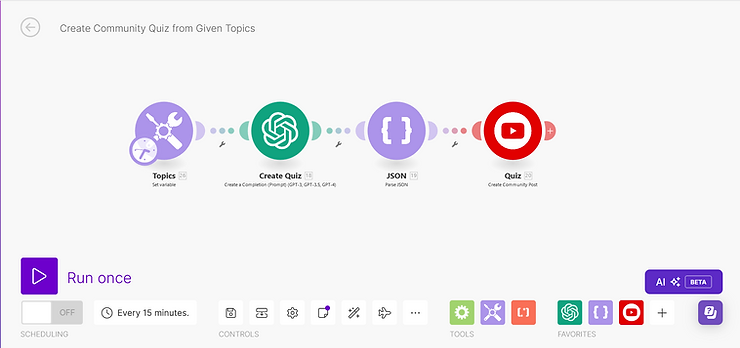
Create an assortment of quiz topics using an Airtable or Google Sheet.
Make multiple-choice responses and quiz questions with OpenAI. Specify all your needs in the prompts, including the YouTube JSON format.
Structure the quiz data using the JSON module.
Before posting it on your community page, validate that the quiz complies with YouTube’s character and format restrictions.
Added Benefits of YouTube Community Automation
Watch our latest video to learn more about YouTube Community Automation

 Contact