It All Started with a Pile of Resumes…
If you’ve ever worked in HR, you know the feeling—your inbox is flooded with resumes, each one demanding time, attention, and careful evaluation. You want to give every candidate a fair shot, but let’s be honest: it’s overwhelming.
We felt the same.
That’s when we asked ourselves:
“What if we could build an AI that screens resumes for us, gives us insights instantly, and even replies to candidates politely—without lifting a finger?”
So, we did.
In this blog, I’ll walk you through how we built an AI Hiring Assistant using tools like Make, Gmail, Slack, and Airtable- that saves hours of work, improves response times, and helps our HR team focus on what matters most – finding the right people.
Let’s dive in.
What Does the AI Hiring Agent Do?
Here’s the workflow at a glance:
- Receives candidate emails
- Extracts resume data
- Matches resume against job requirements stored in Airtable
- Generates a detailed report for HR
- Sends a confirmation email to the candidate
Everything is handled automatically.
Step 1: Set Up Airtable for Job Requirements
We maintain all job requirements in Airtable under a table called job_requirements_data. Each entry includes:
- Role title
- Required skills
- Required experience
- Required education
- Key responsibilities
This structured format helps the AI compare resumes accurately against our needs.
Step 2: Create the AI Agent on Make
We created an agent named AI Hiring Assistant in the AI Agent section of Make.com. The core functionality lies in the system prompt, which guides the agent through the following:
- Check if the email contains a job application
- Ensure an attachment (resume) is included
- Extract data from the PDF using DocCrafter
- Compare the resume against job requirements in Airtable
- Calculate a match percentage
- Summarize candidate strengths and gaps
- Add the data to Airtable
- Notify HR via Slack and the candidate via Gmail
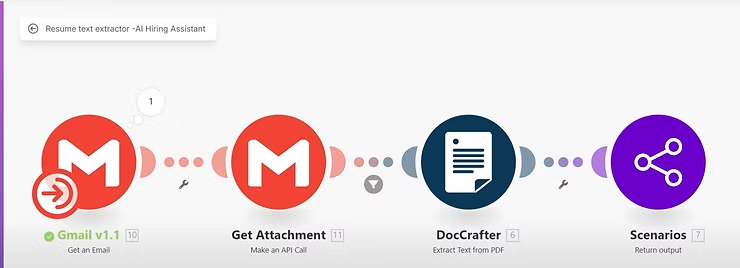
Step 3: Resume Extraction
This step uses the Gmail module to watch for new emails, fetch attachments, and convert them using:
- Gmail: Get Email module
- Make an API Call to get attachment
- DocCrafter: Extract Text from PDF
We convert resume data to binary and extract the content for further processing.
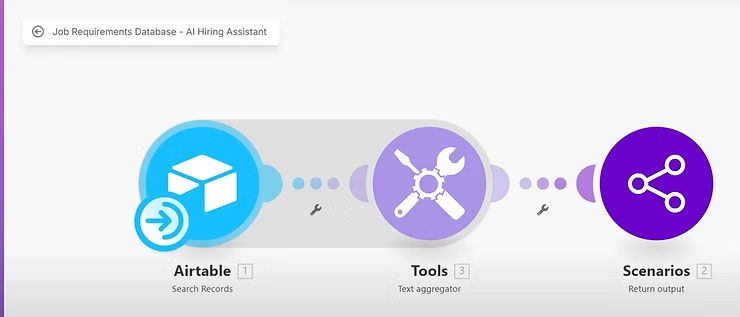
Step 4: Match Skills to Job Requirements
We use the Airtable: Search Records module to fetch all job roles and requirements. The data is aggregated and returned as a single text block.
The AI compares the candidate’s resume data with the job criteria to:
- Calculate a match percentage
- Identify matching and missing skills
- Provide a quick-fit summary
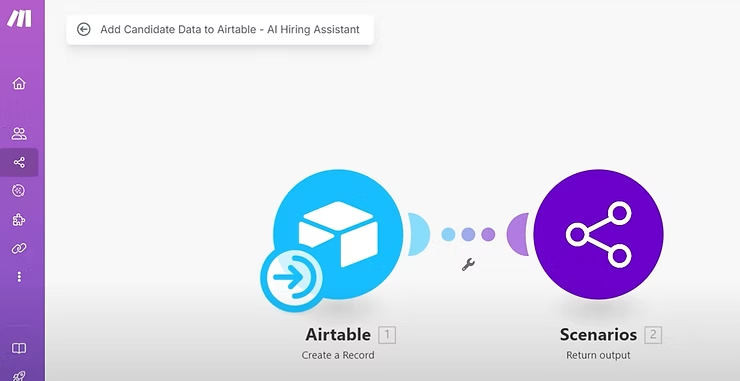
Step 5: Store Candidate Data in Airtable
Using the Create Record module, we feed all insights back into a candidates_data table:
- Name
- Contact info
- Matched role
- Education, skills
- Matching & missing skills
- Summary
- Match percentage
Now everything’s in one place for the HR team.
Step 6: Notify Candidate + HR
Finally, we notify both parties:
- Candidate: A confirmation email using Gmail.
- HR: A Slack message summarizing match score, strengths, and weaknesses.
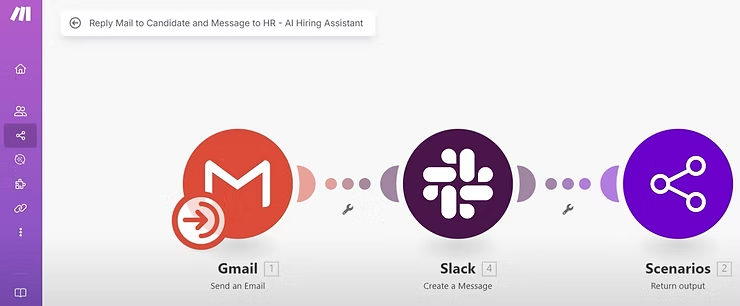
This closes the loop and improves communication transparency.
End-to-End Demo in Action
We tested the workflow with a real candidate, “Nijas Zali”, applying for the AI Engineer role. Within seconds:
- The resume was analyzed
- A 40% match score was calculated
- Skills gaps were identified (e.g., lacking in ML & DL)
- A summary was posted to Slack
- A confirmation email was sent to the candidate
- The resume data was also automatically added to Airtable. No manual review needed.
And the result:
- Saves hours of HR time per week
- Provides consistent, unbiased candidate evaluations
- Ensures faster, transparent candidate responses
- Centralizes all hiring data for easy review
Planning to automate your hiring process?
Need help?
Schedule a meeting with us.